Yarra POS
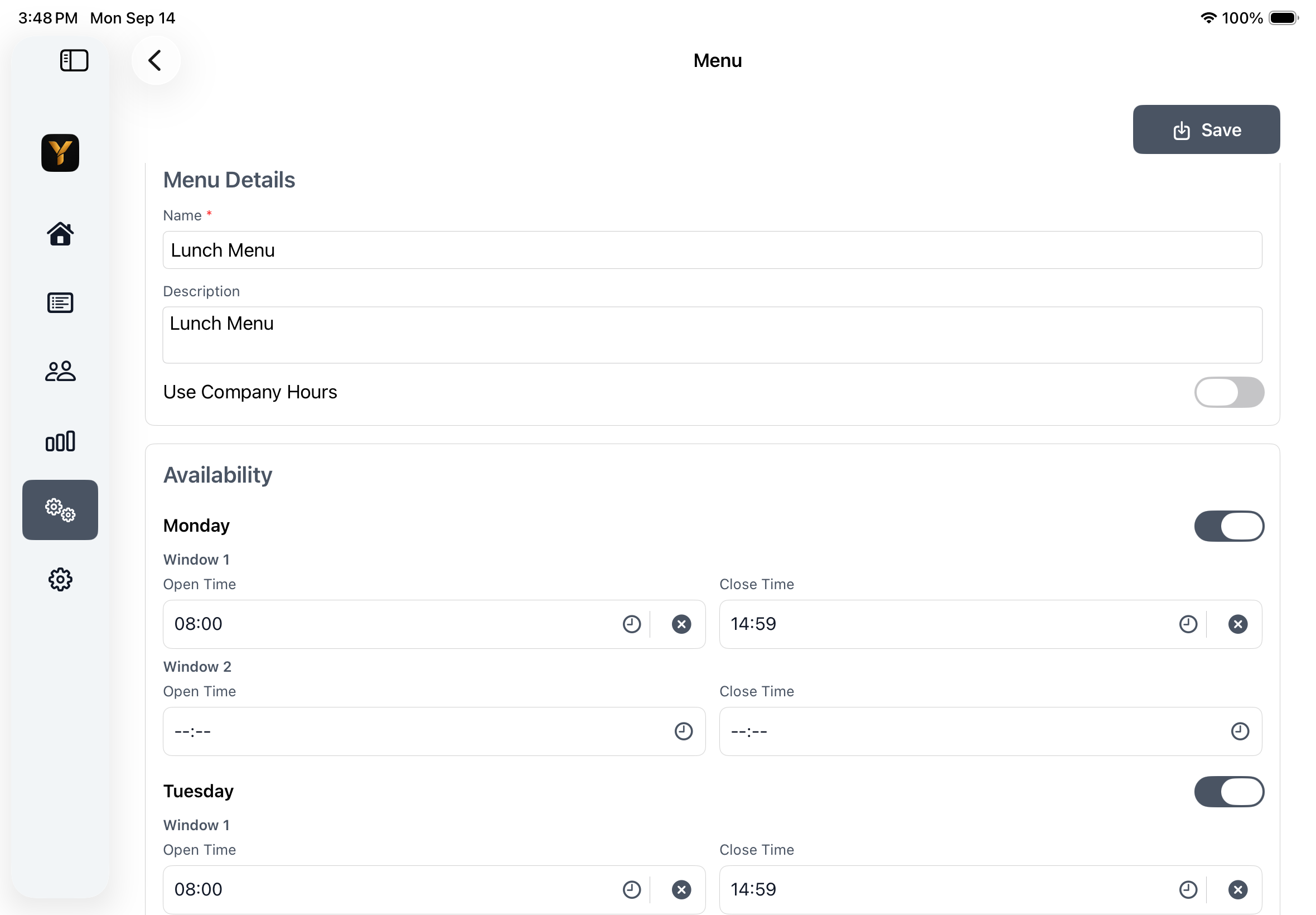
Menu

Restaurant management features

Control the details behind every smooth service.

Configure menus, pricing, staff, tables, printers, delivery, provider online orders, cash operations, and reporting from one connected POS environment.

Yarra POS System Setup on iPad showing management areas for company, users, menus, categories, products, printers, delivery, tables, loyalty, and branches.

Built for restaurant operations

Management controls, organized for quick review.

Use the contents list to jump directly to the operational area that matters to your restaurant.

On this page

01

Company and Store Settings

Keep the restaurant's core operational rules and customer-facing settings in one place.

  • Maintain company identity, contact information, operating hours, taxes, and payment settings.
  • Configure pickup, delivery, ready times, tips, service charges, and loyalty behavior.
  • Manage customer-facing order messages, QR settings, online-order behavior, and temporary pauses.
  • Control server, language, appearance, refresh intervals, receipt copies, and other system preferences.
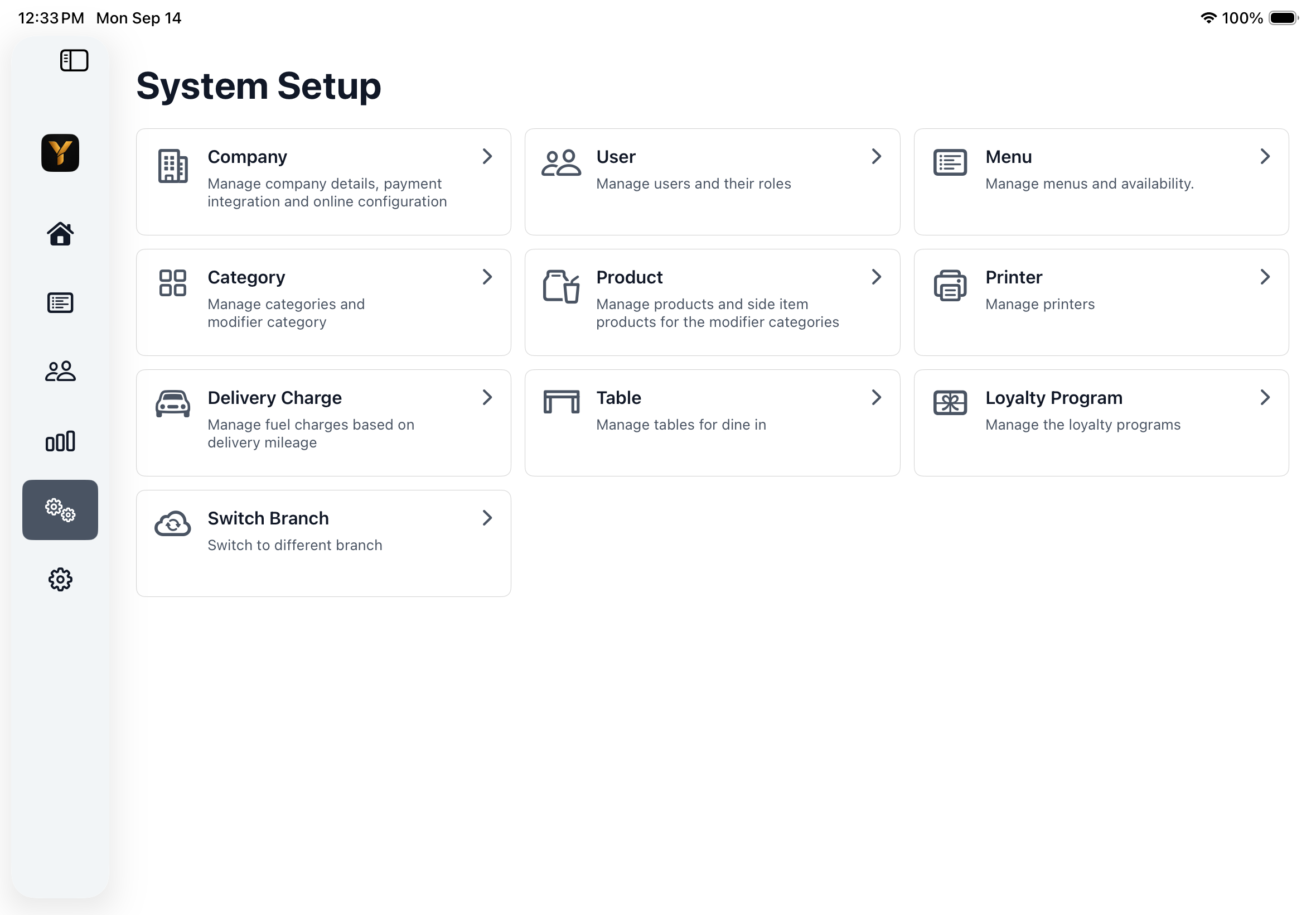
Yarra POS System Setup on iPad with company, user, menu, category, product, printer, delivery, table, loyalty, and branch areas.

03

Categories and Products

Maintain the complete sellable menu with the pricing, availability, and presentation guests expect.

  • Create, search, edit, publish, activate, and order categories and products.
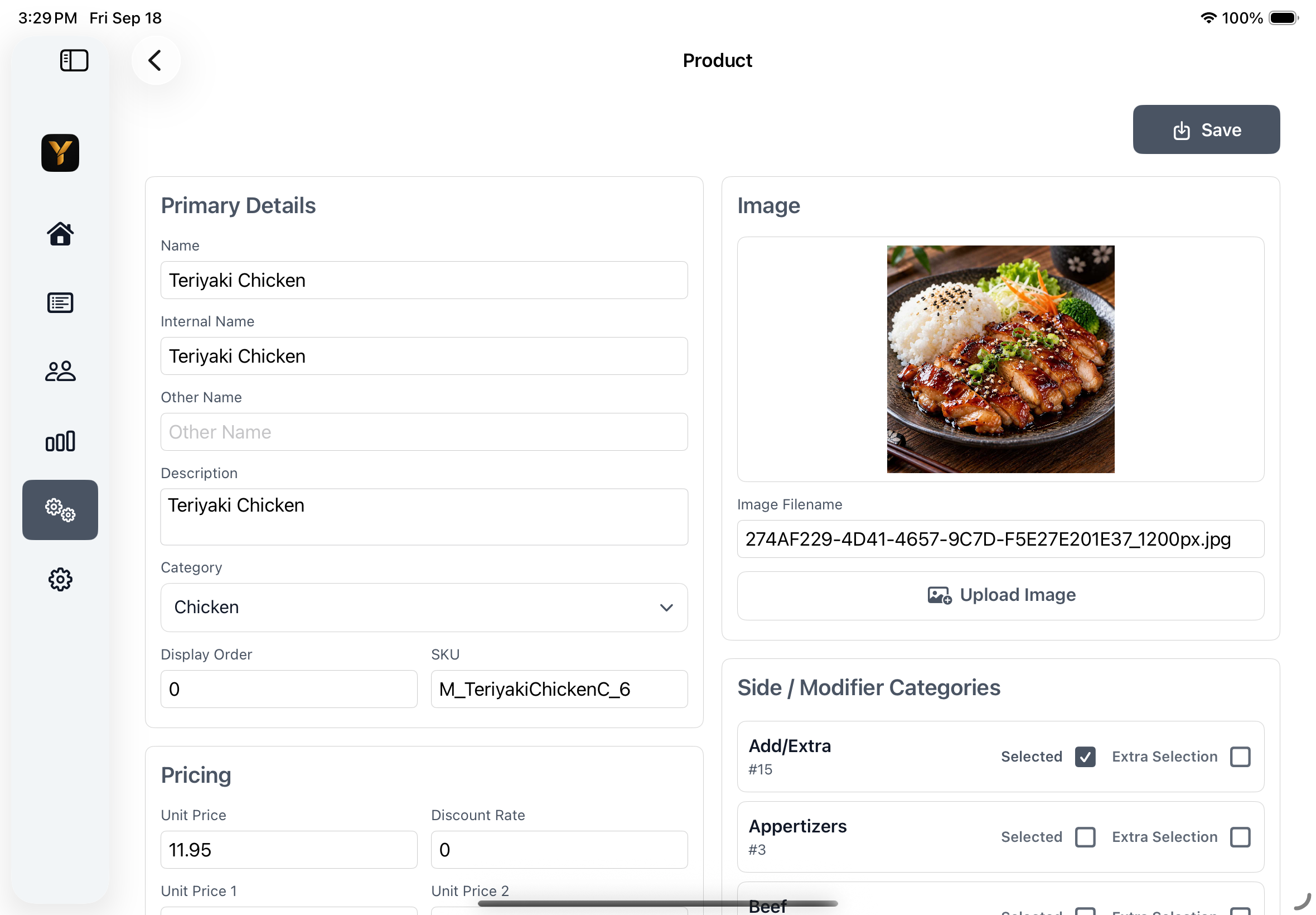
  • Manage names, descriptions, images, SKU, prices, taxes, commission, and display behavior.
  • Configure featured, spicy, dine-in-only, gift-voucher, website, and provider availability.
  • Assign modifier groups, printer destinations, provider mappings, and provider-specific prices.
Yarra POS Product editor on iPad with product details, image, category, SKU, pricing, and modifier assignments.

04

Modifiers and Special Requests

Model the choices staff need to capture for customized restaurant items.

  • Create required, optional, and general modifier groups.
  • Support nested side-item selections, extra selections, quantities, and prices.
  • Link modifier categories to the correct products and printing behavior.
  • Allow custom special requests with optional price, quantity, and taxable status.

05

Pricing, Discounts, and Charges

Apply restaurant pricing rules consistently across orders, customers, and sales channels.

  • Maintain multiple product prices, user pricing profiles, provider pricing, and SKU values.
  • Apply authorized line-item and order discounts with manager controls where required.
  • Configure service charges, tips, tax behavior, and mileage-based delivery or fuel charges.
  • Define reward points, qualification rules, discounts, free products, and eligibility dates.

06

Tables and Dining Room

Shape the table workspace around the restaurant's actual dining-room operation.

  • Create sections, groups, and tables, then position tables with drag and nudge controls.
  • Show available, open-order, and printed-check status with guest and server details.
  • Configure shared-tip operating hours and table-specific workflows.
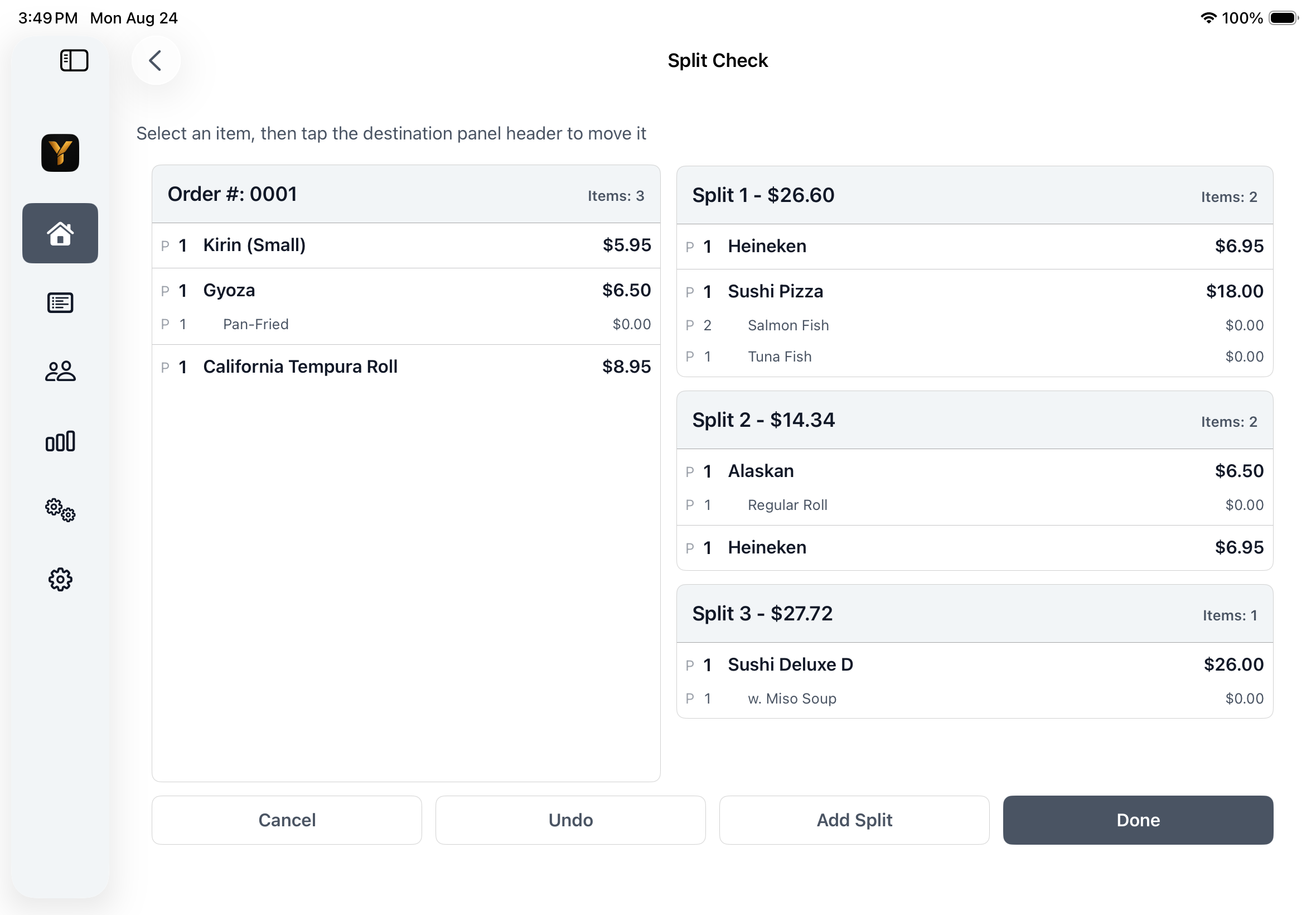
  • Change tables or servers and split or combine eligible checks.
Yarra POS on iPad showing one restaurant order divided into several split checks.

07

Customers, Delivery, and Loyalty

Keep customer history, delivery rules, and repeat-visit programs connected.

  • Maintain names, multiple phone numbers, addresses, directions, remarks, notes, and customer flags.
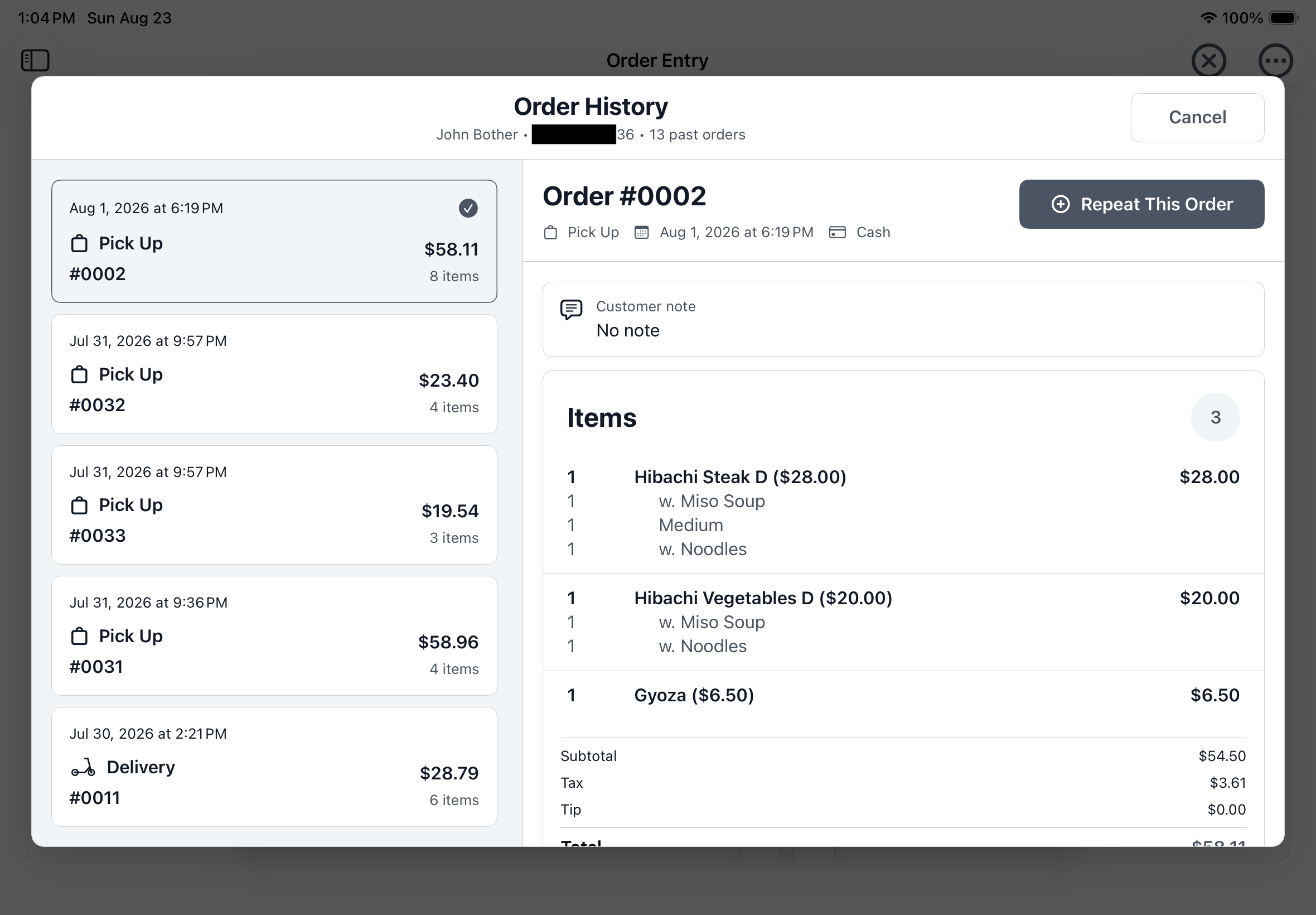
  • Use Caller ID, address autocomplete, ZIP and delivery-area checks, mileage, and past-order lookup.
  • Configure delivery-charge mileage ranges and automatic or manual fuel charges.
  • Define loyalty points, discounts, free products, categories, quantities, order types, and claim rules.
Yarra POS Customer Order History on iPad with previous orders, item details, and a repeat-order action.

08

Provider Online Orders

Configure and supervise provider online-order connections without separating them from POS operations.

  • Handle pending provisioning, binding, synchronization, enabling, disabling, and deprovisioning.
  • Control store online status, preparation time, busy state, holidays, notifications, and receipt copies.
  • Map categories and products, manage channel pricing, preview menus, and update stock.
  • Validate and upload menus, then approve, cancel, and monitor publishing jobs.
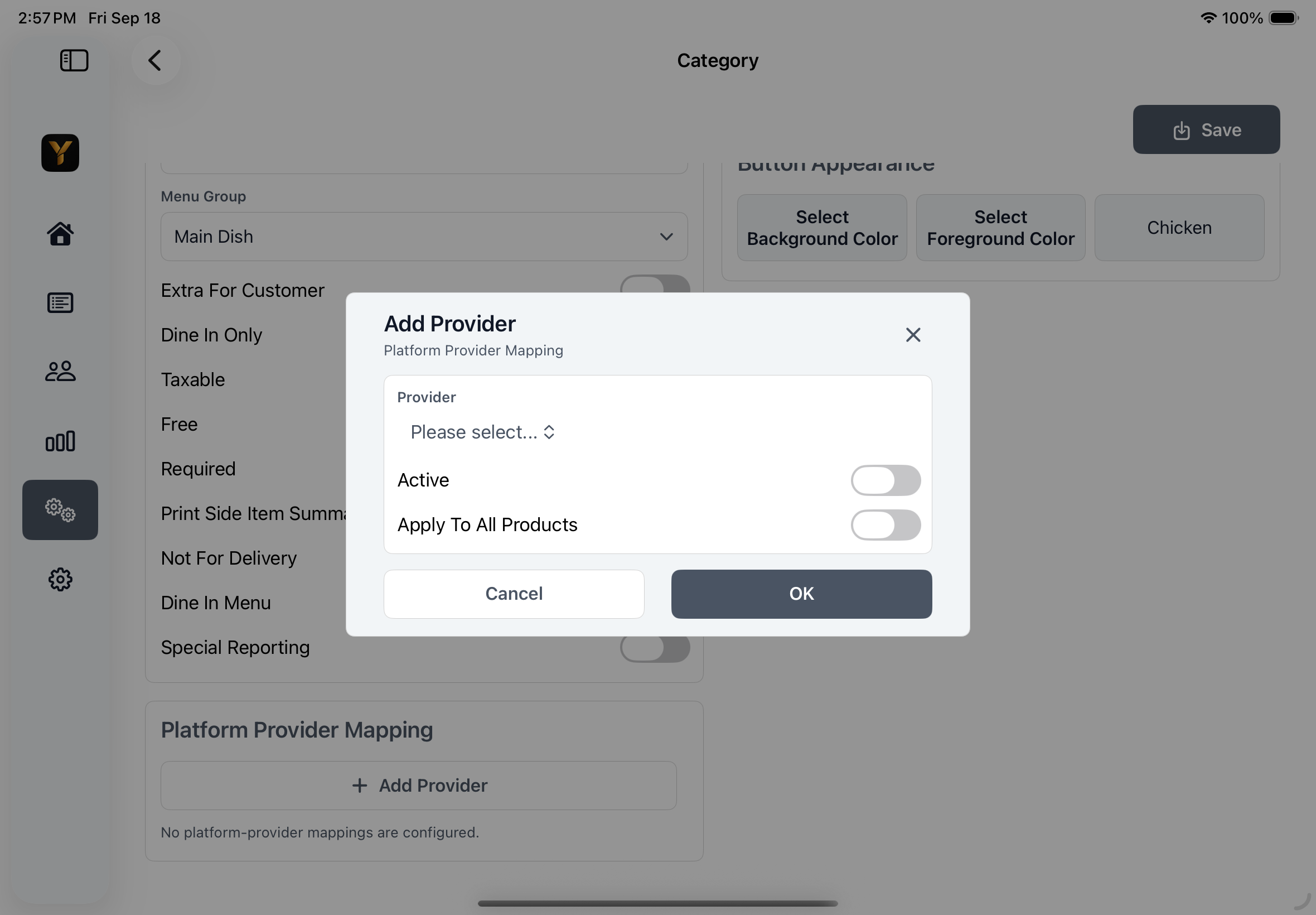
Yarra POS Add Provider dialog on iPad showing a generic provider mapping for a menu category.

09

Users, Roles, and Staff

Give each team member the access and staff tools appropriate to their work.

  • Assign Administrator, Team Lead, Cashier, Waiter, Driver, and Chef roles.
  • Manage quick codes, active and locked status, validity dates, pricing profiles, and provider permissions.
  • Issue temporary manager approval codes and require fresh authorization for protected actions.
  • Clock staff in or out and search, edit, print, or export time-card records.

10

Cashier and Cash Management

Track register responsibility from opening float through final reconciliation.

  • Record cashier-in float by denomination and add extra cash when needed.
  • Compare expected and counted cash with variance, retained cash, withdrawal, and replenishment details.
  • Warn about unpaid orders or shortfalls and produce cashier closing reports.
  • Record money in and out, review balances, manage staff bank, and print reconciliation activity.

11

Printers, Kitchen Tickets, and Labels

Direct receipts, preparation tickets, and labels to the destinations used by the restaurant.

  • Configure network receipt, kitchen, bar, report, void, gift, and credit-card destinations.
  • Route by category, product, and order type with formatting, copy, and local-device options.
  • Test connections and maintain multiple device-local receipt-printer profiles.
  • Configure ZPL-II label size, resolution, font, per-unit output, and continuation labels.
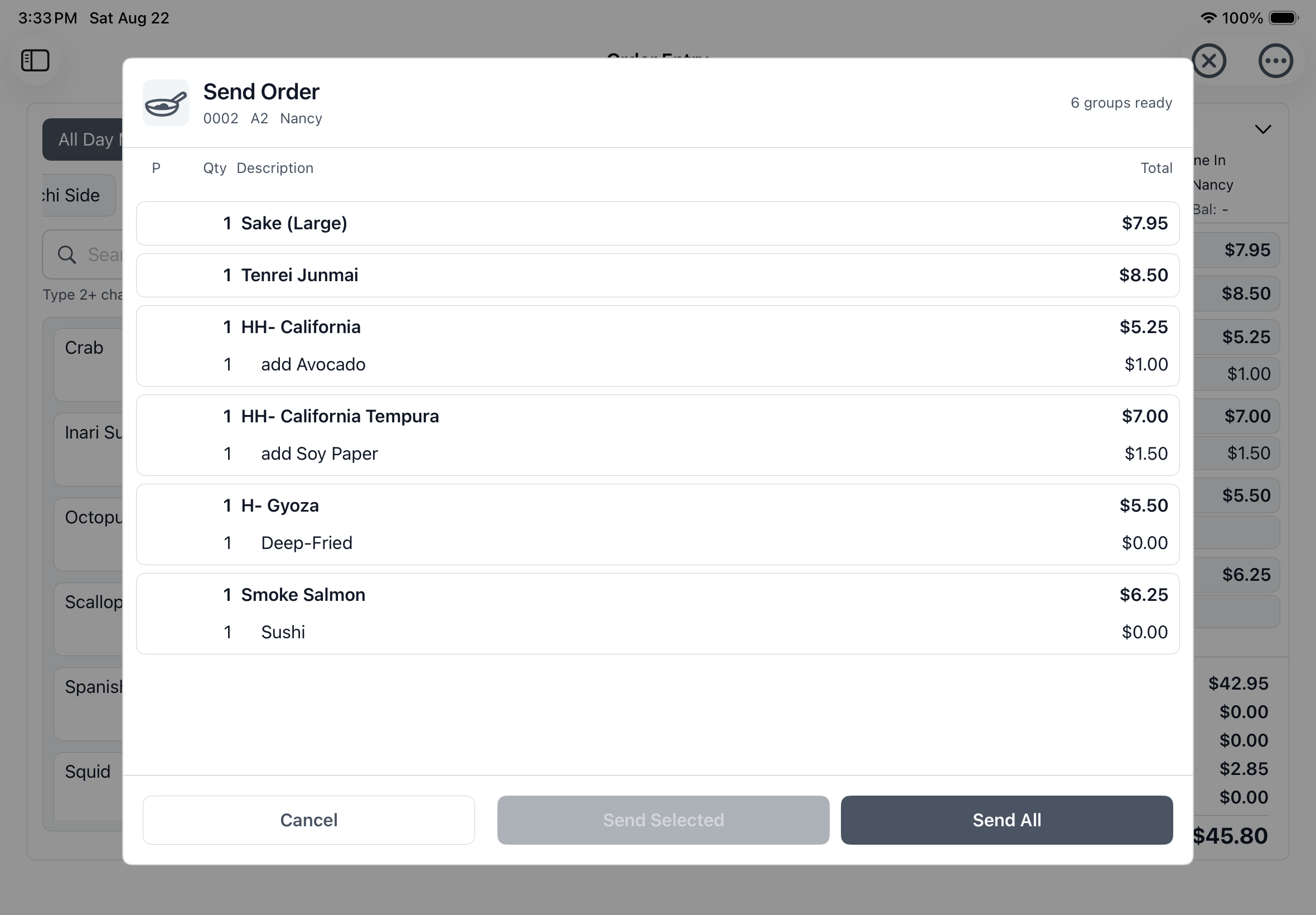
Yarra POS Send Order screen on iPad showing item groups ready for configured preparation and printing destinations.

12

Orders, Payments, and Audit Controls

Review active and completed transactions with the controls needed for accountable corrections.

  • Filter, search, refresh, and batch-select dine-in, walk-in, pickup, delivery, online, unpaid, paid, and cancelled orders.
  • Void orders, assign drivers, change servers, notify customers, and print selected destinations.
  • Review payment history, refund, void, adjust tips or amounts, and print merchant or customer receipts.
  • Use manager approvals, void reasons, duplicate-payment safeguards, and protections for printed or paid items.
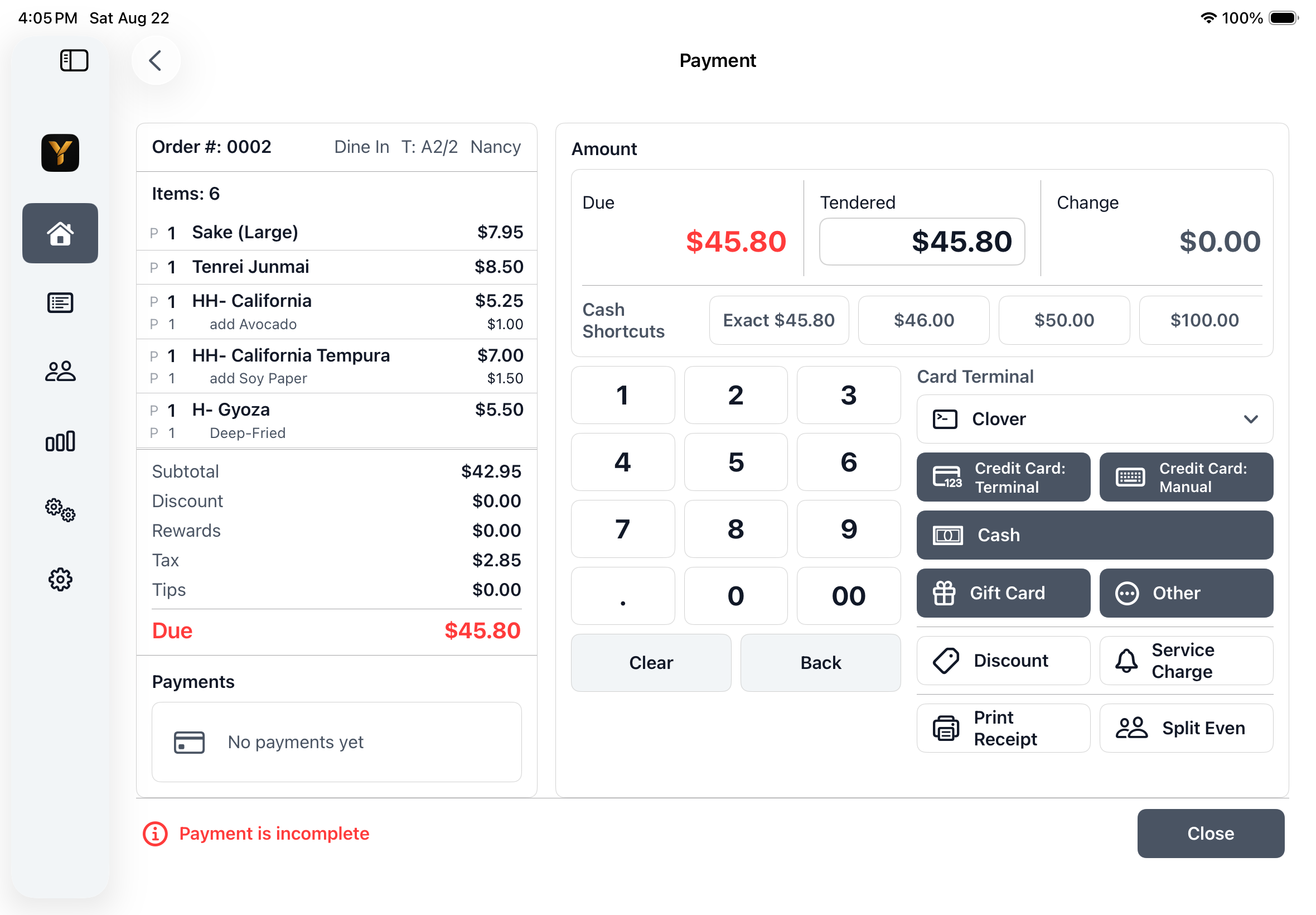
Yarra POS Payment screen on iPad showing an order, balance due, cash controls, and configured payment methods.

13

Reports and Business Insights

Review restaurant performance from daily sales through category, delivery, tip, and payment activity.

  • Run Sales Reports with date, discount, cancellation, order-type, payment, tip, loyalty, terminal, and category metrics.
  • Review Sales by Category with category selection, product detail, quantity, and sales totals.
  • Analyze Delivery by driver, payment, tips, charges, and adjusted cash.
  • Review Tips, Staff Bank, Cash Reconciliation, and Credit Card Batch summaries, details, printouts, and supported exports.

14

Branch Operations

Move between authorized restaurant branches while keeping the active operating context clear.

  • View and select branches available to the signed-in user.
  • Switch the POS session to the selected branch through the established sign-in flow.
  • Keep branch-specific menus, settings, staff access, and operational data in context.
  • Use the same familiar iPhone and iPad workflow after an authorized branch change.

Explore Yarra POS with your restaurant workflow.

Talk with Yarra Systems about the management controls, service workflows, and compatible setup your restaurant needs.

Yarra POS application screen